

At Measure, we build an open source mobile observability platform. One of the trickiest things to track on Android is the dreaded Application Not Responding (ANR) error. When the UI thread of an Android app is blocked for too long, Android decides to throw this error and lets the user kill the app.
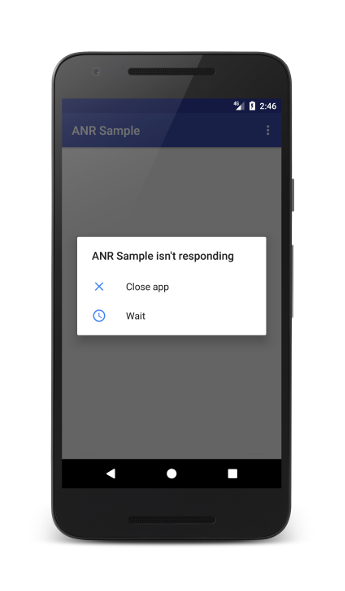
This post is about how we detects ANRs and the attempts we made before getting it right.
Main thread watchdog
We started with the simplest and most well known way to detect ANRs. Run a watchdog thread that periodically posts a token to the main thread’s Handler. If the token doesn’t come back within 5 seconds, track an ANR event. The implementation was entirely in Kotlin and easy to ship.
The problem was that it was flaky in practice. The watchdog would fire on hangs that Android itself wouldn’t classify as ANRs, while missing real ANRs reported by the system.
The root issue is that Android doesn’t have a single universal ANR timeout. There are different thresholds and trigger conditions. For example, input dispatch ANRs are triggered when the main thread fails to respond to input events within 5 seconds, while broadcast receivers, services, foreground service startup, content providers and JobScheduler interactions all have their own timeout rules.
We did not end up shipping this.
Using ApplicationExitInfo
From API 30 (Android 11) onwards Android itself writes a full ANR dump automatically. ActivityManager returns a list of ApplicationExitInfo records describing the app’s recent process exits including ones with REASON_ANR. It also contains the state of every thread at the time of crash.
However, this API has a few limitations.
First, it’s API 30 and above only. We support older releases (API level 21 and above) where ApplicationExitInfo doesn’t exist. We needed ANR detection that works on every device our SDK runs on.
Second, it only tells you about process exits after the fact. We only see the record on the next app launch, by which point everything we’d have wanted from the moment of the ANR (for example a screenshot of the moment the ANR occurred) is gone with the process.
Third, the system keeps these records in a bounded ring buffer, and older entries get evicted as new ones come in. There’s no guarantee the specific ANR we want is still around when the app is launched again.
We use ApplicationExitInfo where it’s available, but cannot fully rely on it to achieve our goals.
The real signal
Signals are how Unix-style operating systems poke a process when something asynchronous happens. Pressing Ctrl+C in a terminal sends SIGINT to the foreground process. A segmentation fault generates SIGSEGV. Each signal has a number (SIGINT is 2, SIGKILL is 9, SIGQUIT is 3) and a default behavior the kernel applies if the process doesn’t override it.
For SIGQUIT, the default on Linux is to terminate the process and write a core dump. Android overrides this behavior. It shows the “App Not Responding” dialog and writes an ANR report.
All we needed was a way to intercept this signal, record an ANR and pass it back to the system to continue doing its thing. It was harder to do than we initially thought.
Catching SIGQUIT
The obvious first move to detect a signal is to register a signal handler. So we registered one to handle SIGQUIT.
struct sigaction sa = { .sa_handler = on_sigquit };
sigaction(SIGQUIT, &sa, NULL);
In a regular Linux process this is enough to get notified of the signal.
On Android the handler never runs.
To see why, it helps to know there are two ways a thread can deal with an incoming signal.
The first is what we just did. Install a handler with sigaction, and when the signal arrives the kernel pauses the thread mid-instruction, runs the handler, and resumes. The catch is that the handler runs in interrupted context. You can’t allocate, take a mutex or call into the JVM. The list of things you can safely do (the async-signal-safe list) is short.
The second approach is to block the signal on every thread, then dedicate one thread to pulling it off the pending queue with sigwait or sigwaitinfo. The signal arrives as a return value rather than an interrupt, so the dedicated thread runs in ordinary context and can allocate, take locks, and call into the runtime.
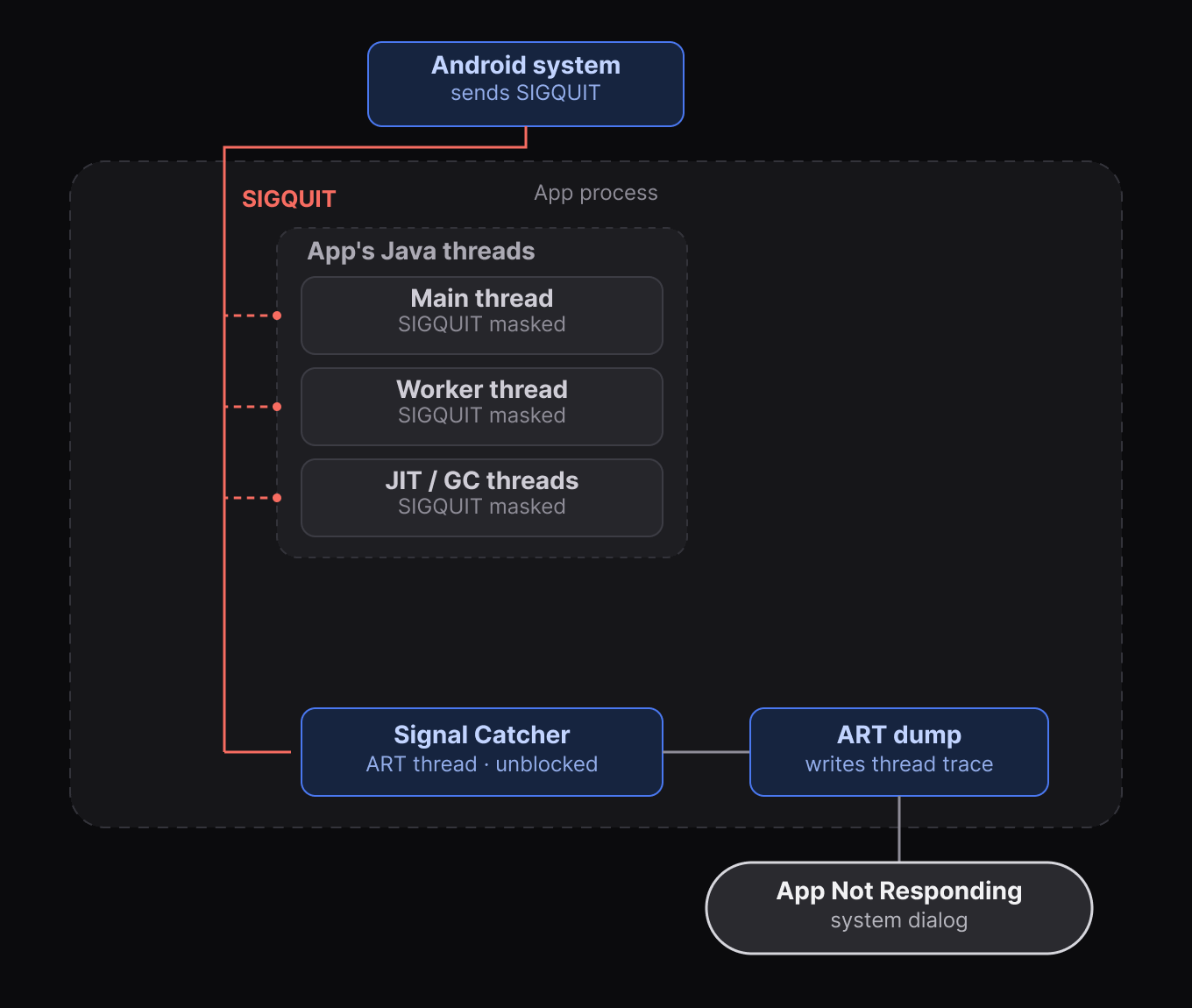
Android picks the second pattern for SIGQUIT. At runtime startup, it blocks SIGQUIT in every thread and spawns a dedicated thread named Signal Catcher that sits in a loop calling sigwaitinfo. When SIGQUIT arrives, no thread has it unblocked, so the kernel has nothing to interrupt. The signal sits in the pending queue until Signal Catcher pulls it out to produce the ANR trace.
That’s why our handler never fired. Installing a handler doesn’t unblock the signal, and every thread inherited SIGQUIT blocked at runtime startup. The kernel had no thread to interrupt, so the signal queued, and Signal Catcher continued it’s work.
Watchdog 2.0
To get our handler running, we need our own thread in the process with SIGQUIT unblocked. Then SIGQUIT becomes deliverable, the kernel picks our thread, and the handler runs.
We spawn one thread, call it Watchdog, and unblock SIGQUIT for it with pthread_sigmask. Signal masks are per-thread, so Signal Catcher is unaffected. Watchdog is now the only thread in the process where SIGQUIT is unblocked, which makes it the only thread the kernel can deliver to.
The handler waits for the signal to arrives.
static void on_sigquit(int sig) {
    sem_post(&anr_sem);
}
The trick is to keep the handler as small as possible and have Watchdog do the real work after the handler returns. A semaphore makes the handoff.
Watchdog spends most of its life waiting on the semaphore. When SIGQUIT arrives, the kernel runs our handler on Watchdog. The handler wakes the semaphore and returns. That’s all it does, because waking a semaphore is one of the few things you can safely do from inside a signal handler.
Watchdog is now back in its own code. The handler ran on this thread, did one async-signal-safe thing, and returned. Everything past the semaphore wait is ordinary thread code, so Watchdog can take locks, allocate, call into the JVM, walk threads and capture the state we want for the ANR.
This works, but now it breaks the platform’s ANR flow.
Signal Catcher is still parked in sigwaitinfo, waiting on a signal we just consumed. No SIGQUIT means no “App Not Responding” dialog.
Handing the signal back
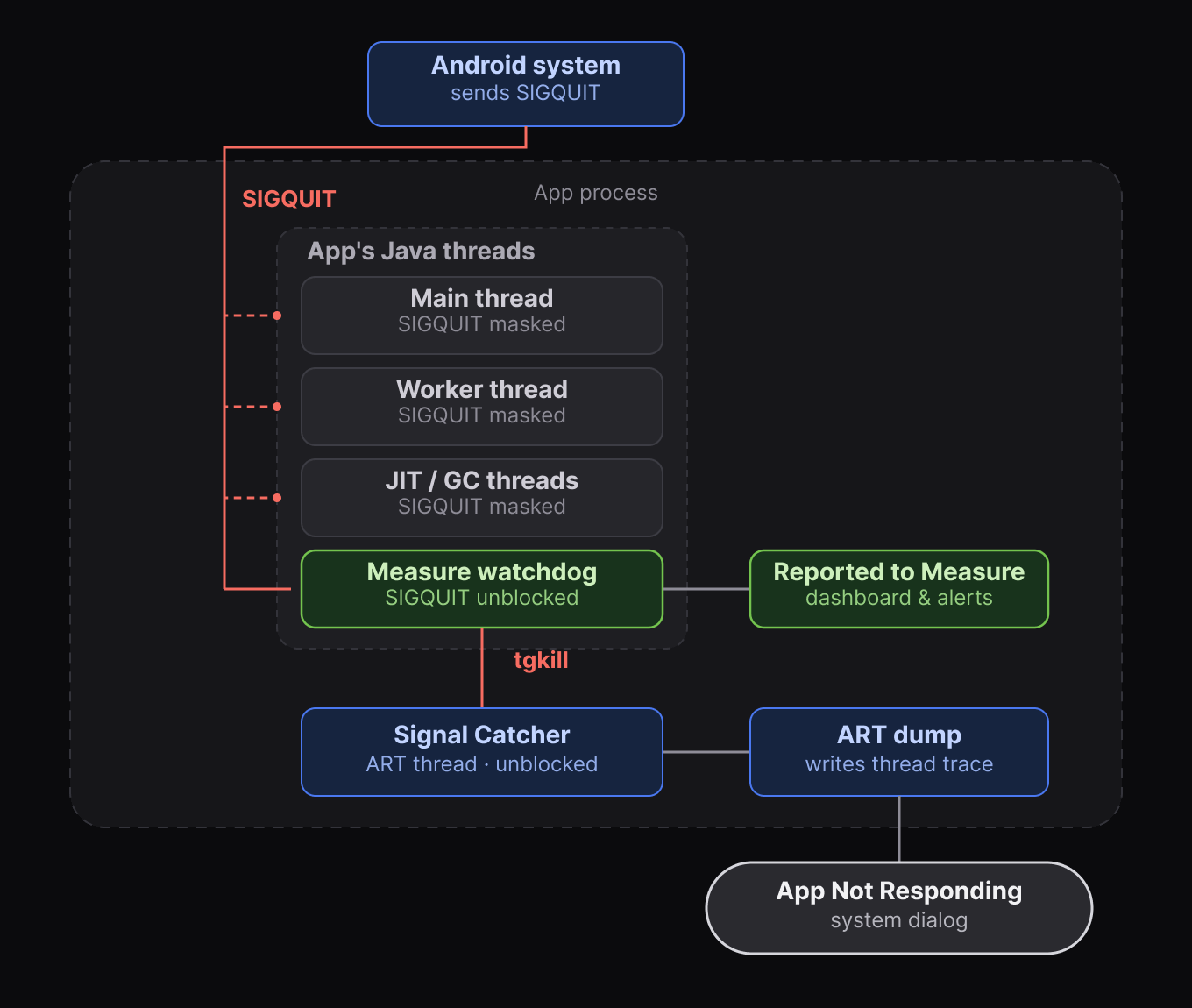
Watchdog needs to send a fresh SIGQUIT to Signal Catcher so the platform machinery continues to run.
We can’t just send another SIGQUIT to the process. The kernel looks for a thread with SIGQUIT unblocked, finds Watchdog (still the only one), and the signal comes right back to us.
We need to target Signal Catcher directly. The primitive for that is tgkill, which delivers a signal to a specific thread by its TID. Which we don’t have.
Getting Signal Catcher’s TID is the awkward part. There’s no API for it, but /proc/self/task/ has a directory for every thread in the process, and each directory has a comm file with the thread’s name. At SDK init we walk the directory once, find the entry that reads “Signal Catcher”, and grab its TID. When an ANR fires we record it and send SIGQUIT back to Signal Catcher via tgkill.
The platform’s ANR flow now runs as it would have without us in the picture, except we now have our own data captured at the moment it happened.
Putting ANRs on the timeline
Capturing an ANR is complex, but fixing them is even harder. We did all of this so that every ANR comes with the full picture of what led up to it.
First, a timeline of events that occurred before the ANR was triggered: HTTP requests, navigation transitions, lifecycle callbacks, gesture events and custom events.
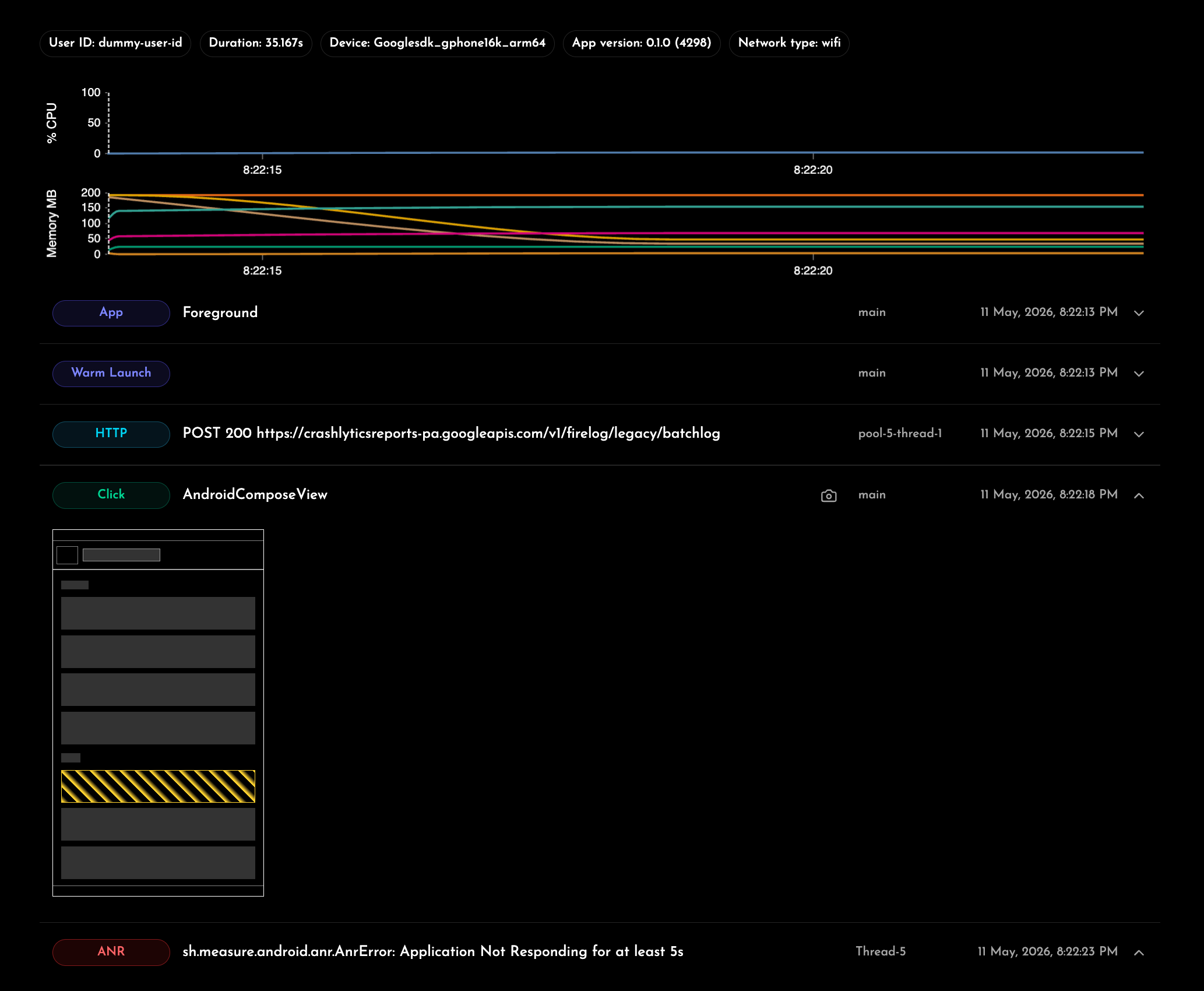
Second, the ApplicationExitInfo record from Android along with the stack trace it provides. Third, an optional screenshot of the screen at the moment the ANR fired.
This allows scrolling back through the session to see what the user was doing right up to the moment the app froze.
You can interact with a real session timeline at https://measure.sh/product/session-timelines.
Sources
The native ANR detection code lives in our Android SDK on GitHub. On the platform side, AOSP’s signal_catcher.cc is the file that implements the Signal Handler thread.
The man pages for the functions and signals mentioned above are linked below for reference.